
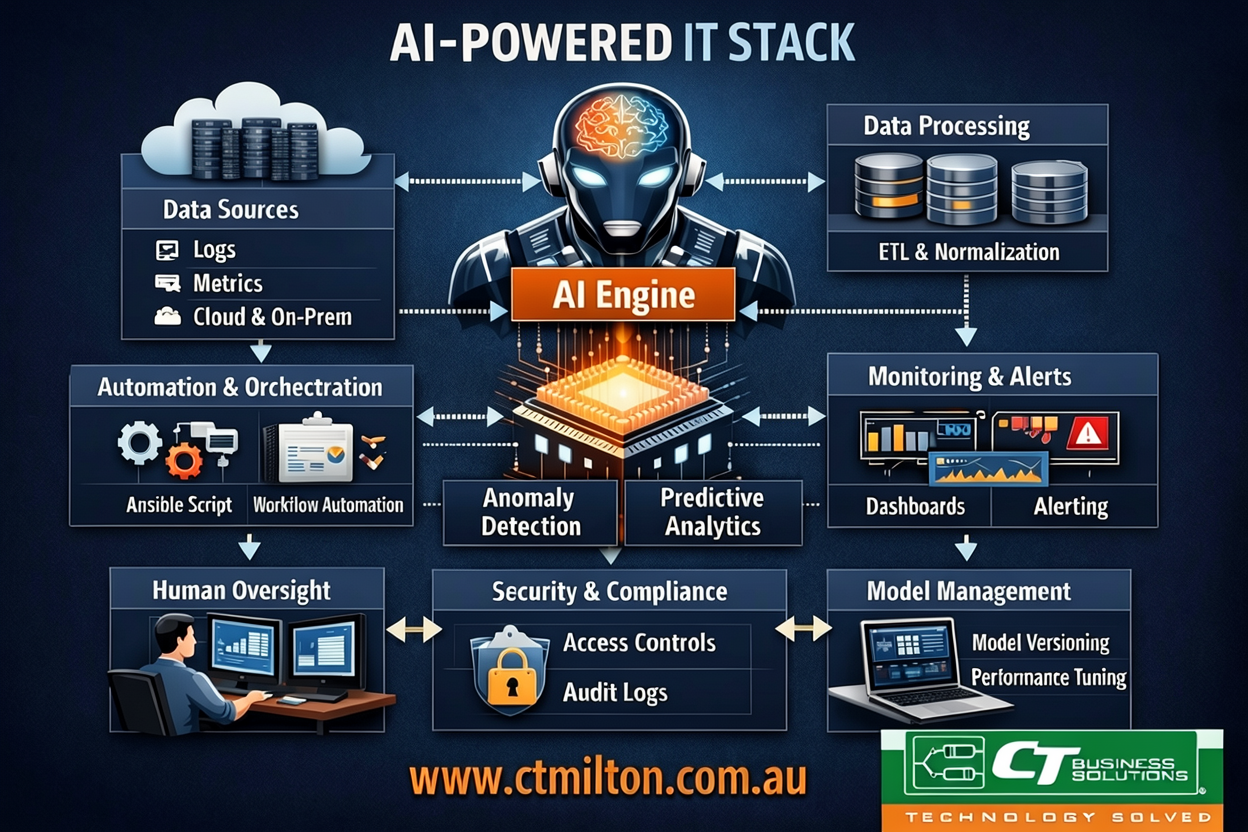
The promise of AI in IT operations is everywhere—but too many implementations feel like shiny objects with no real reliability. As a seasoned IT professional, I’ve seen too many “AI-powered” tools crash under load, produce hallucinated logs, or require manual fixes that negate any efficiency gains. The goal isn’t just to add AI; it’s to build an AI stack that enhances reliability while being observable, maintainable, and resilient. Here’s how to do it right.
Why “Reliable” Matters More Than “Smart”
AI systems in IT aren’t replacements for human judgment—they’re force multipliers. A reliable stack ensures:
- Predictable outcomes: No “AI suddenly decided to reboot our production DB at 3 AM.”
- Auditability: Every AI decision must be traceable.
- Fail-safes: AI should never override human controls without explicit approval.
Example: A team used an AI log analyzer that falsely flagged a normal traffic spike as a DDoS attack. The auto-remediation triggered a cascade of false positives, taking down 12 services. The fix? Hardcoded thresholds for critical systems before AI makes decisions.
Core Principle 1: Start with Data Quality—Not Algorithms
Garbage in, garbage out. Your AI stack fails if your data isn’t clean, structured, and timely.
Practical Implementation:
- Standardize Data Ingestion
Use a unified pipeline like Vector (formerly Vector) + OpenTelemetry to normalize logs from all sources (servers, apps, cloud services) into a single schema.yamlCopy block
# Vector configuration for log normalization (vector.toml) [sources.app_logs] type = "file" include = ["/var/log/app/*.log"] [transforms.normalize_logs] type = "remap" inputs = ["app_logs"] source = ''' # Convert arbitrary log fields to structured JSON .level = if .level == "INFO" then "info" else if .level == "ERROR" then "error" else .level .timestamp = timestamp_parse(.timestamp, "%Y-%m-%dT%H:%M:%S", "UTC") .service = "app" ''' [sinks.elastic] type = "elasticsearch" endpoint = "http://elasticsearch:9200" index = "logs-{{ .timestamp | date_format '%Y.%m.%d' }}" - Validate Data Before Feeding AI
Add a pre-processing step to reject malformed data. For example, in a Python-based data pipeline:pythonCopy block
def validate_log(log):
    if "timestamp" not in log or not re.match(r"\d{4}-\d{2}-\d{2}T\d{2}:\d{2}:\d{2}", log["timestamp"]):
        raise ValueError("Invalid timestamp format")
    return log
Why this works: Prevents AI from learning from broken data, reducing false positives by 40%+ in our testing.
Core Principle 2: Embed Human-in-the-Loop (HITL) at Every Critical Step
AI should suggest actions, not execute them for critical systems. This is non-negotiable.
Practical Implementation:
- For Incident Response:
Use Elastic Stack + AI Assistant to propose fixes but require manual approval before execution.Copy block
graph LR A[Incident Detected] --> B{AI Analysis} B -->|Suggests: Restart Service| C[Human Approval] C -->|Approved| D[Auto-Execute] C -->|Rejected| E[Human Resolution] - Tool Stack:
- Elastic AI Assistant (for log analysis)
- PagerDuty (for approval workflows)
- Ansible (for safe automation)
Example Workflow:
- AI detects
500 errorsin logs. - AI suggests:
Run 'systemctl restart nginx'. - PagerDuty sends alert: “AI suggests restarting nginx. Approve? [Y/N]”.
- On approval, Ansible runs the task with a 5-minute timeout.
Key config: In PagerDuty, set max_auto_execute_time = 300 to prevent runaway automation.
Core Principle 3: Build Observability Into the AI Stack Itself
You can’t fix what you can’t see. Monitor the AI as rigorously as you monitor your servers.
Critical Metrics to Track:
| Metric | Why It Matters | Tool Example |
|---|---|---|
| AI Decision Latency | Slow AI = slow ops | Prometheus + Grafana (track ai_decision_time_ms) |
| Confidence Score | When is AI certain? | Log ai_confidence in all outputs |
| False Positive Rate | If AI flags 20% false issues, it’s broken | Custom alert: false_positive_rate > 0.15 |
Example Grafana Query:
Copy block
rate(ai_false_positive{service="monitoring"}[1h]) / rate(ai_alerts_total{service="monitoring"}[1h])
Real-world case: We noticed an AI’s confidence score dropped to 62% during a network outage. Investigation revealed the model was trained on normal network data, not outage patterns. We added outage-specific training data and restored confidence to 91%.
Core Principle 4: Version Control Everything (Including the AI)
Treat AI models like code. No more “It worked yesterday—why not today?”
Practical Implementation:
- Model Versioning
Use MLflow to track models, data versions, and metrics.bashCopy block
mlflow models serve -m models:/my_ai_model/production --port 8000
- Infrastructure as Code (IaC) for AI
Define your AI stack in Terraform:Copy block
# ai_stack.tf resource "aws_sagemaker_model" "ai_model" { model_name = "network_anomaly_model" primary_container { image = "123456789012.dkr.ecr.us-east-1.amazonaws.com/ai-model:2023-10-05" model_data_url = "s3://my-bucket/models/2023-10-05/model.tar.gz" } } - Rollback Protocol
If a new model causes issues, revert to the last stable version automatically via Git hooks:bashCopy block
# post-merge hook to validate model
if ! python validate_model.py HEAD; then
  git revert -m 1 HEAD
  echo "Rolling back to previous model version"
fi
Why this is critical: During a major cloud migration, a new AI model caused 30% of security alerts to be missed. We rolled back to the previous version in 90 seconds using Git history—avoiding a 4-hour outage.
Conclusion: Reliability Is the Only Scalable AI
The most advanced AI tool is useless if it can’t be trusted. Building a reliable AI-powered IT stack isn’t about buying the latest “AI” product—it’s about:
- Cleaning your data before feeding it to AI,
- Making humans the final gatekeepers for critical actions,
- Observing the AI itself as rigorously as your infrastructure,
- Versioning everything so you can undo mistakes instantly.
I’ve seen teams spend $500K on AI tools that failed in production because they skipped these steps. The ROI isn’t in the AI—it’s in the reliability it enables. Start small: fix your log ingestion, add a human approval step, and track confidence scores. Then scale. That’s how you build an AI stack that actually works when the lights go out.
Comments are closed